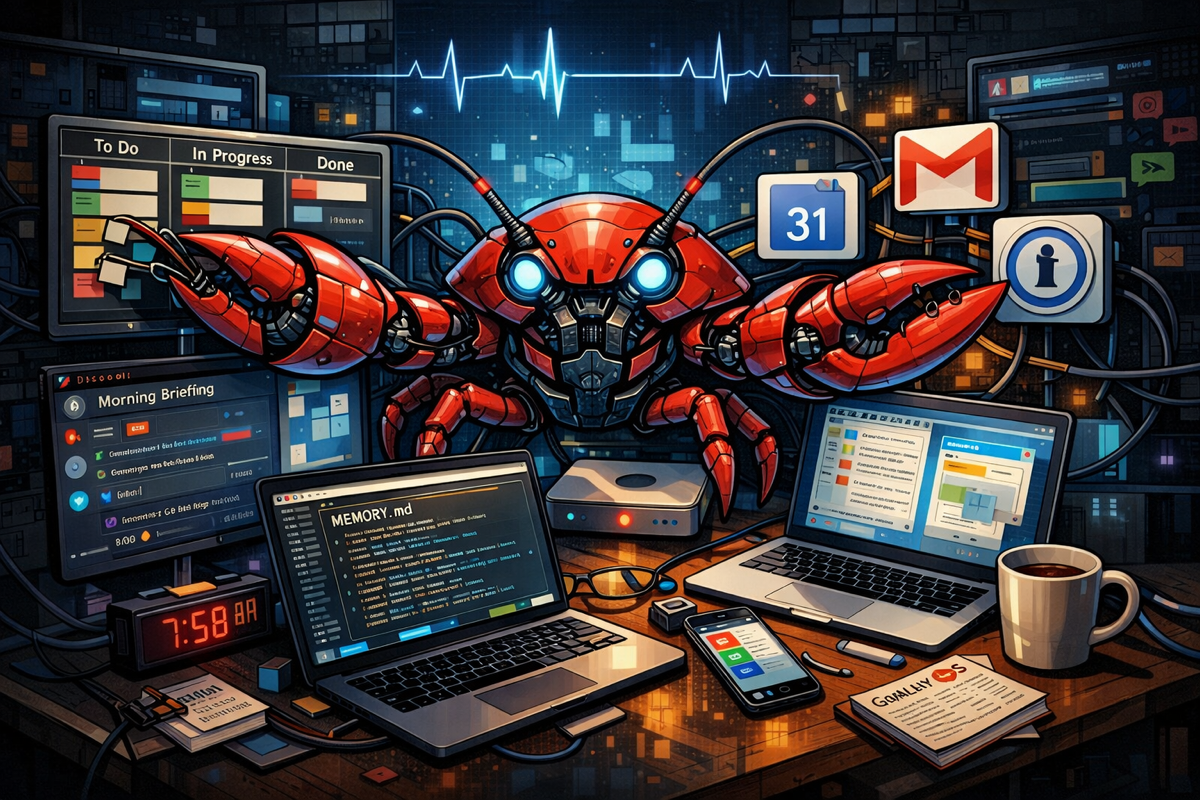
I gave an AI access to my email, calendar, messages, and files. I let it work while I sleep. I let it move tasks around on my board, draft my morning briefings, and ping me when something needs attention. This isn’t a hypothetical. It’s my life for the past month.
The Setup
In late January 2026, I installed Clawdbot 🦞 (OpenClaw’s original name)— an open-source framework for running AI assistants that actually integrate into your life. Not a chatbot you visit when you have a question. An agent that lives in your infrastructure, reads your context, and does work on your behalf.
My instance “Clawdbot” runs OpenClaw on a Mac mini at home. It connects to Discord for messaging, Gmail for email, Google Calendar for scheduling, and a local Kanban dashboard for task management. It has a 1Password service account for secure credential storage, maintains memory files that persist between sessions, and checks in every hour via “heartbeats” to see if anything needs attention.
Why Bother?
A reasonable question. ChatGPT exists. Copilot exists. Why run your own AI agent with all the infrastructure overhead?
Two reasons.
First: Control. When Microsoft adds AI to Outlook, I don’t get to decide what it does. I don’t see how it prioritizes my inbox. I don’t know what patterns it’s learning from my behavior. The AI just appears, and I’m supposed to trust it. And in the case of Copilot for consumer apps, Microsoft is certainly making it appear front and center, whether you want their agent or not.
With OpenClaw, I built every integration myself. I know exactly what data flows where, because I wrote the scripts. I defined the guardrails and the limits. Because everything is a markdown file, I can read Clawdbot’s memory files and see what it remembers. I can edit files through Obsidian on Mac or iPhone. I can check the dashboard and see what tasks it’s working on. Transparency isn’t a feature request — it’s the architecture. Best of all, I pick the LLMs used for specific tasks.
Second: Agency. Most AI assistants are reactive. You ask, they answer. OpenClaw agents can be proactive. Clawdbot checks my email during heartbeats and flags important messages. It picks up tasks from my Kanban board and works on them while I’m away. It generates ideas based on my social feeds overnight and stages them for my morning briefing. I didn’t want an assistant I had to remember to use. I wanted one that was already working when I woke up.
What It Actually Does
Here’s what I’ve built over the past few weeks:
Daily Briefings. Every morning at 8am, Clawdbot generates a digest defined by a template to present me with: trending topics from Twitter/Bluesky/Reddit/HackerNews filtered through my interests (AI, infosec, Apple, maker projects), upcoming calendar events, email triage, and three new ideas for blog posts or projects; all directly to my Discord DM.
Kanban Workflow. I run a local dashboard with a task board, file browser, and OpenClaw console link. When I move something to “To Do,” Clawdbot picks it up during its next heartbeat and starts working. When it’s done or blocked, it moves the card and pings me. I wake up to completed work.
Google Docs Sync. For a Finland trip planning doc, Clawdbot maintains bidirectional sync between a local Markdown file and Google Docs. You can edit in Google or locally; changes merge automatically every five minutes.
Gmail Integration. Clawdbot can read my email, count unread messages, search for specific threads, and flag anything urgent. OAuth tokens stored in 1Password, refreshed automatically. If anything goes wrong, I can rotate the 1Password key to act as a killswitch.
Memory System. Daily logs in memory/YYYY-MM-DD.md capture what happened each day. A separate MEMORY.md holds long-term context — my preferences, pet peeves, things I’ve told it not to do again. A brain/ folder contains documents on concepts, people, and projects that accumulate over time. All of these files are reread by the agent for any changes to maintain the ability to get work done.
Heartbeat Tasks. Every hour, Clawdbot runs through a checklist: check for OpenClaw updates, pick up Kanban tasks, and periodically review memory files. These are defined in Markdown skill files, easy to add or modify.
What It Costs
OpenClaw itself is free and open-source. The AI backbone is Anthropic’s Claude, which runs about $20/month for my usage level. I use Opus (the most capable model) for direct conversations and Sonnet (cheaper, faster) for background tasks like morning briefings. A single overnight idea-generation run costs about $0.04.
The real cost is time. Setting this up took several weekends of configuration, debugging, and refinement. The daily briefing format went through multiple iterations before I was happy with it. The Google Docs sync required OAuth setup, pandoc conversion, and conflict handling. Every integration has its own quirks. All handled by OpenClaw, managed by me.
Is it worth it? For me, yes. I’m an AI evangelist and an infosec professional. I want to understand how these systems work, not just use them. Running your own agent will teach you things you’ll never learn from a polished product. For most people? Probably not yet; this is early-adopter territory.
What Goes Wrong
It’s not all smooth sailing.
Token expiration. Google OAuth tokens expire if the app is in “testing” mode. I had to publish my Google Cloud project to production to get persistent tokens. Took a few hours of confusion to figure out.
Rate limits. Hit Anthropic’s rate limit once during a busy day. The failover to a cheaper model didn’t trigger correctly early on.
Format drift. AI-generated content drifts over time. My daily briefings started omitting links, changing section order, and over-summarizing. I had to lock down the format with explicit templates and validation steps.
Model costs. The first week, I was running Opus for everything. When the bill projection got spicy, I learned to route routine tasks to Sonnet. Then Haiku. Add in a bit of OpenAI and Gemini, and the costs start to spread out across cheap and free models.
Context limits. Long conversations eventually hit the context window. Compaction helps, but sometimes context gets lost in ways that matter.
What I’ve Learned
Explicit beats implicit. Every time I assumed Clawdbot would “figure it out,” something went wrong. The more explicit my instructions, the better the results. AGENTS.md, SOUL.md, TOOLS.md — these files exist because vague expectations produce vague outcomes. Be specific. B E Specific.
Memory is manual. AI assistants don’t actually remember things between sessions unless you build the infrastructure. OpenClaw’s memory files are a workaround, not a solution, if you do not tune this yourself.
Proactive requires design. Making an agent proactive means defining when it should act, what it should check, and how it should report. The heartbeat task system took several iterations to get right.
Security is your problem. OpenClaw gives you power. That means credential management, secret handling, and access control are on you. I moved everything to 1Password with a service account specifically for this. Avoid ClawHub and randomly published skills like the plague. Moltbook? You have to be crazy to use that.
The assistant shapes the workflow. For common tasks, I now think in terms of Kanban columns because that’s how Clawdbot picks up work. My morning routine includes checking Discord for the briefing.
The Experiment
I wrote previously about “quiet automation”, where AI embeds itself into workflows without explicit consent, creating dependencies before you realize they’re being built. This is the opposite experiment. I’m building the dependencies deliberately. I know exactly where Clawdbot fits into my life because I put it there. I can see the seams. I can undo any of it.
That visibility has a cost: effort. The default path is easier. Let Microsoft add Copilot everywhere. Let Google summarize your inbox. Let the AI just happen. That’s just another version of the “many inboxes” problem, where you now have a bit of AI happening here, and a bit over there, and none of it is coordinated.
I’m trying the hard path: making AI assistance intentional, transparent, and controllable. Treating my agent like infrastructure I own, not a service I rent. Giving it access so that it can put things together at my command. A month in, it’s working. My mornings are more informed. Tasks get done while I sleep. I’m learning things about AI agents that I couldn’t learn any other way.
With the news that Sam Altman has just performed an amazing coup in snatching up OpenClaw creator Peter Steinberger, I’m excited to see where this new turn takes the race between frontier AI companies. Anthropic had a great chance to embrace Clawdbot and put a nail in OpenAI’s coffin to go along with their string of recent defeats, but they chose to go a crazy legal route to fight them on a name that screamed “Use Claude!” and alienated a lot of developers.
The claws are wide open. Let’s see what they catch.
Ernie Oporto writes from New Jersey about AI, information security, and the intersection of both at Artificially Flavored Intelligence.


One response to “With Claws Wide Open”
[…] arrival of OpenClaw at the end of January and the reveal of NemoClaw on Monday at GTC have made for a busy few weeks […]